Paid now runs on the Stripe Reader T600 countertop terminal
Last updated
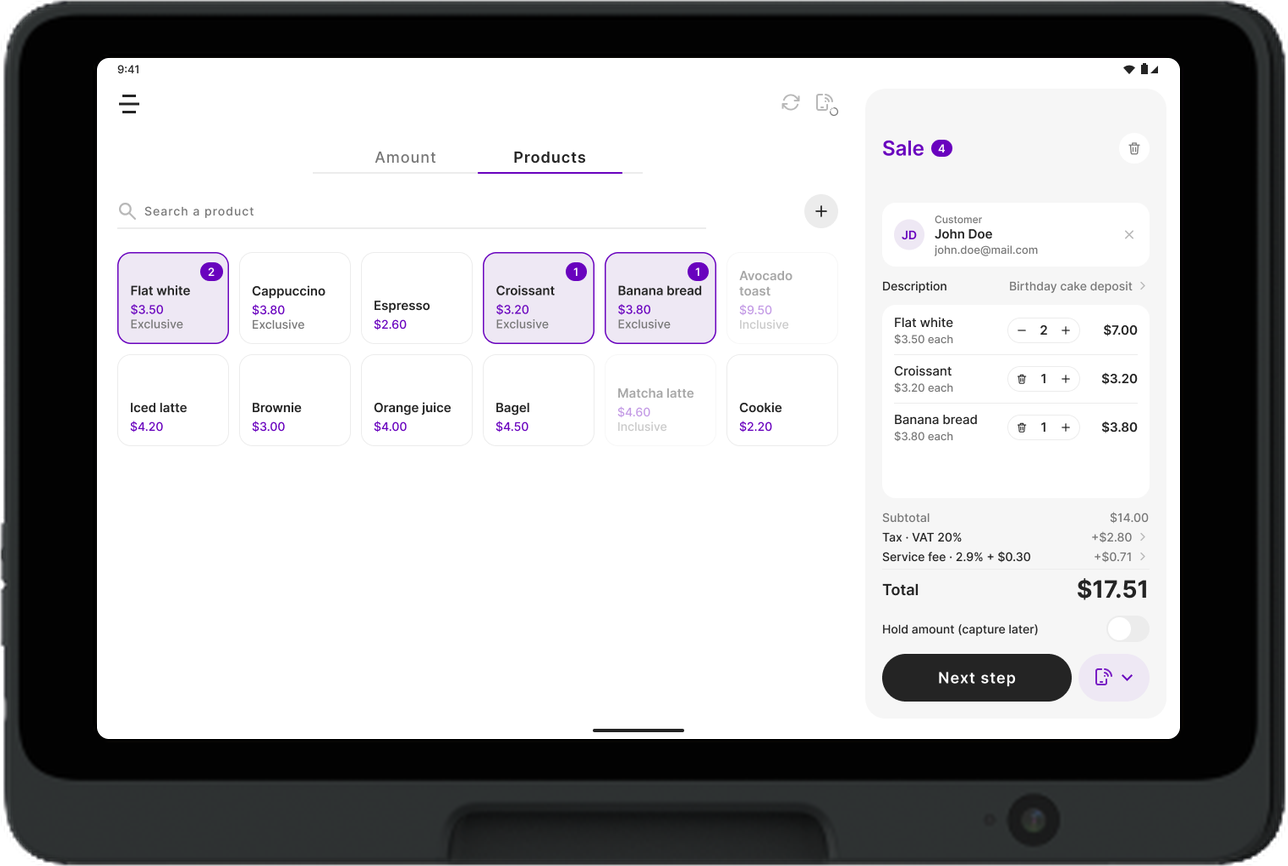
The Stripe Reader T600 is Stripe's countertop card terminal: an 8-inch touchscreen that stays plugged in at your register and takes tap, chip and swipe payments into your Stripe account. With Paid running directly on the reader, you ring up the sale on its screen and the customer pays on the same device, with no phone, tablet or computer next to it.
It costs $329 in the US, and you buy it from Stripe. Paid adds 0.99% per transaction on top of Stripe's standard in-person fees, with no monthly fee.
Who the T600 is for
The T600 is built for a fixed checkout. It suits:
- Shops, cafés and bakeries with a counter where every customer pays.
- Quick-service restaurants and food counters.
- Front desks at salons, gyms, studios and clinics.
If you take payments at the table, at the door or on the move, a handheld Stripe Reader S700 or S710 is the better choice. If you sell from your phone, Tap to Pay needs no reader at all.
What you get with Paid on the T600
- A register on the reader itself. Enter an amount or add products from your catalog on the 8-inch screen, then hand over to the customer to pay.
- A screen the customer can read. The large display shows the items in the sale, the total and tip options.
- Every way to pay in person. Contactless cards, Apple Pay, Google Pay, chip and PIN, and swiped cards.
- The rest of Paid. Tips, taxes, passing the card fee to the customer, team members with roles and payment history, all in your own Stripe account.
- Your phone as a backup. The T600 also works with the Paid app on iPhone and Android, the same way a Bluetooth reader does, as long as both are on the same network.
Stripe also has a no-code "standalone mode" for its smart readers, but its documentation lists it for the S700/S710 and the Verifone V660p, not the T600. With Paid, the T600 runs a full point-of-sale app.
How to set up the T600 with Paid
- Download Paid on your phone and connect your Stripe account.
- Plug the T600 into power with the USB-C cable. It turns on by itself. Connect it to the internet over Wi-Fi, or Ethernet with the Reader Hub.
- On the reader, swipe in from the left edge of the screen, tap Settings, enter the admin passcode 07139 and tap Generate pairing code.
- In the Stripe Dashboard, switch to the Stripe account you connected to Paid. Go to Terminal → Readers, click Register reader, enter the three-word code and choose a location.
- Restart the reader by holding the power button on the back for one second. Paid installs and opens on its own, which can take a few minutes.
- Sign in and take your first payment.
The T600 page has the same steps with more detail on choosing the right Stripe account.
T600 vs S700/S710
| Stripe Reader T600 | Stripe Reader S700 / S710 | |
|---|---|---|
| Made for | A fixed counter or register | Carrying to the customer |
| Screen | 8 inches | 5.5 inches |
| Power | Plugged in over USB-C, no battery | Battery, about 15 hours of active use |
| Internet | Wi-Fi or Ethernet | Wi-Fi or Ethernet, plus 4G on the S710 |
| US price | $329 | $299 |
| Runs Paid on the reader | Yes | Yes |
| Offline payments with Paid | Yes | Yes |
Not sure which fits? The reader finder recommends a reader based on your country and how you sell.
What it costs
You pay three things:
- The reader: $329 in the US. Prices differ by country, so check Stripe's T600 page for yours.
- Stripe's in-person fee: 2.7% + 5¢ per payment for US cards. In the UK and the eurozone it is 1.4% plus 10p or €0.10 for local cards.
- Paid: 0.99% per transaction, with no monthly or setup fee.
A card reader has no per-payment Tap to Pay fee, so on a $50 sale in the US Stripe takes $1.40, Paid takes $0.50, and you keep $48.10. The Tap to Pay fees guide compares this with taking the same payment on a phone.
Frequently asked questions
What is the Stripe Reader T600?
It is Stripe's countertop card terminal, with an 8-inch touchscreen. It stays plugged in at your register and accepts contactless, chip and swiped cards, plus phone and watch wallets. Payments go into your own Stripe account.
Can the T600 work without a phone or computer?
Yes. Paid runs directly on the T600, so you enter the sale and the customer pays on the same device. You can still connect it to the Paid app on your phone if you prefer to ring up sales there.
Does the T600 have a battery?
No. It runs on USB-C power, so keep it plugged in at the counter. To take payments away from the register, choose a Stripe Reader S700 or S710 instead.
Is the T600 available in my country?
The T600 is sold in the US, the UK, Canada, Australia and many European countries, but not every country where Stripe Terminal works. The T600 page lists every country where you can use it with Paid.
How much does it cost to use Paid with the T600?
Paid charges 0.99% per transaction on top of Stripe's standard fees, with no monthly or setup fees. You buy the reader from Stripe.

